
Malware Analysis — Zeus Banking Trojan
Basic Static Analysis
Let’s gather some information about the malicious file. We already have the benefit of knowing that it malicious, but we will pretend that we are analyzing a file that we’ve never seen before.
Firstly let’s run the following command in the terminal: file invoice_2318362983713_823931342io.pdf.exe. To which we get…
file invoice_2318362983713_823931342io.pdf.exe
invoice_2318362983713_823931342io.pdf.exe: PE32 executable (GUI) Intel 80386, for MS Windows
This is a basic fingerprinting command that will show you some very rudimentary information about the potentially malicious file. However, what’s standing out is the fact that it has 2 file types (.pdf.exe). Since we ran the file command, we are now seeing that it is a portable executable (PE).
Another thing we can do for our fingerprinting is use something called DIE (Detect It Easy) by running
die invoice_2318362983713_823931342io.pdf.exe
Then we should see the following window
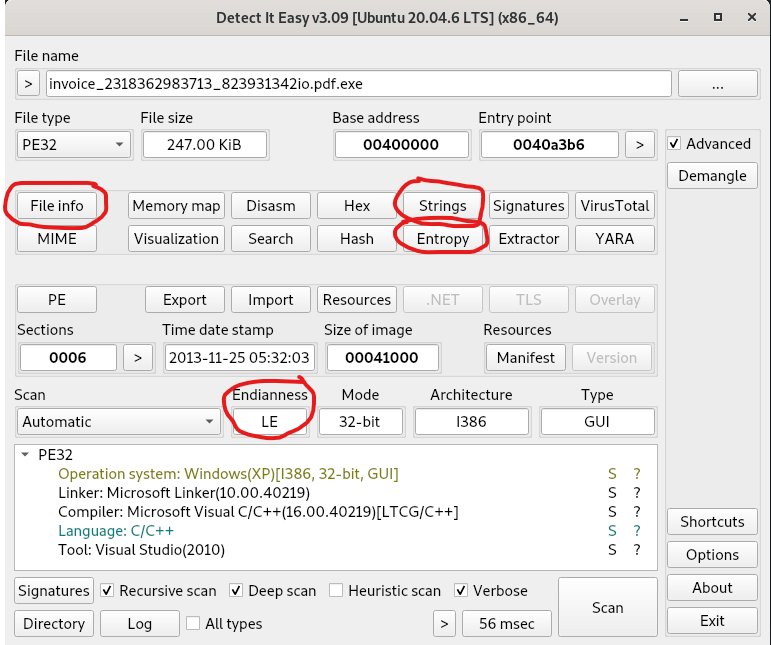
Some key things to point out are circled in red
- File info — Shows basic information about the file itself, a bit like running “file”
- Strings — Shows sequences of readable text embedded within a binary like the one we’re analyzing. Examples of text include: file paths, URLs, IPs, registry keys, function names, encryption keys or passwords.
- Entropy — This is a measure of randomness or disorder. It can be really useful for detecting packing, encryption or obfuscation in binaries. Entropy is a score from 0–8, with 0–4 as low entropy meaning that it is more predictable. On the flip side, 7–8 is seen as high entropy meaning there is a lot of random data, which could indicate that there is encryption or compressed data.
- Endianness — Refers to the order in which bytes are arranged in memory to represent multi-byte values. Little-Endian storing the least significant byte first and big-endian storing the most significant byte first. When reverse-engineering malware or analyzing memory and network data, reading bytes in the wrong order gives you the wrong value.
Let’s look at the strings within this binary and see if we can find anything of value?
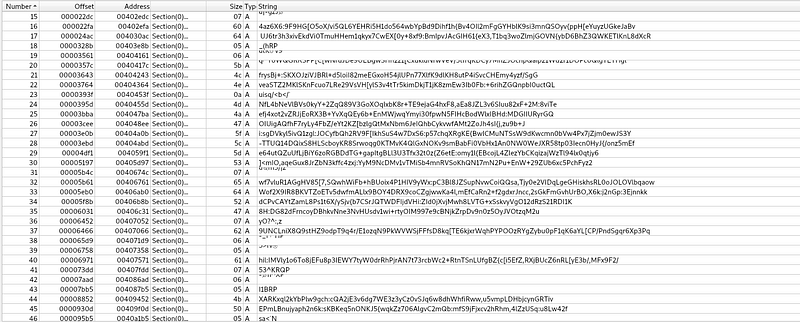
Upon first glance, we can see what looks to be a lot of gibberish and random characters, which could indicate obfuscation. However, I have noticed something else here that looks a bit out of the ordinary. We can see identifiable functions with things like “SetCurrentDirectoryA” after them. Also there seems to be some obfuscation going on in between the functions. Something like this is worth investigating more in the likes of Cutter or Ghidra.
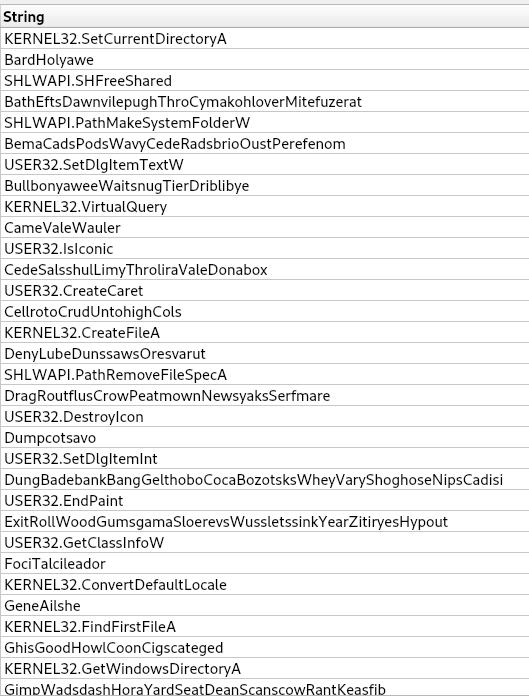
For now, let’s use the search bar to sift through these strings for key points.
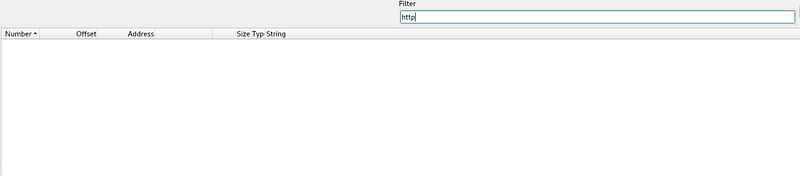
Searching for http doesn’t bring back any results

However, searching for “.com” does bring back something, which looks like a domain called “corect[.]com”. Let’s investigate this domain to see what we can find.
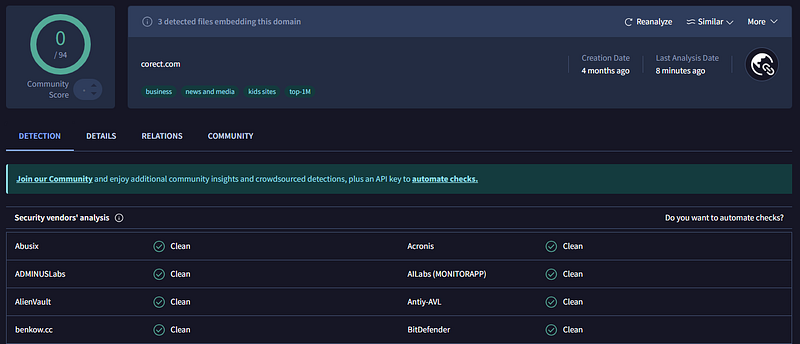
Apparently, that domain is clean, so I believe this was intended to be misleading on purpose to send me down the wrong path, which means we need to keep looking for anything suspicious.
Let’s pivot and see if we can determine what functions this binary has by running the following command
manalyze invoice_2318362983713_823931342io.pdf.exe -p imports
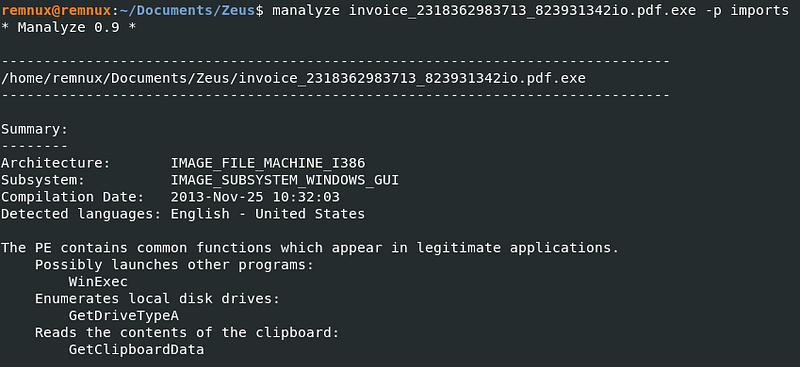
So judging by how little functions there are, I would label this as suspicious, because even the most basic of programs like a “Hello World”! program would have more. This is giving me a clear indication that this file is packed.
Another thing I have noticed from the above screenshot is that there are no networking APIs like InternetOpenA or HttpOpenRequestA. This would suggest that this executable may not be capable of calling out to a remote address.
Does this mean we should rule it out? Absolutely not, it just means this executable doesn't statically import any networking functions. We now have a couple of options.
1. It could be packed, which is most likely
- It injects into another process
- It's a first-stage dropper
We will revisit this at a later stage though.
Something else that we can look at, which can help paint a clearer picture of what we are dealing with, is using something called capa. By running the following command.
capa invoice_2318362983713_823931342io.pdf.exe
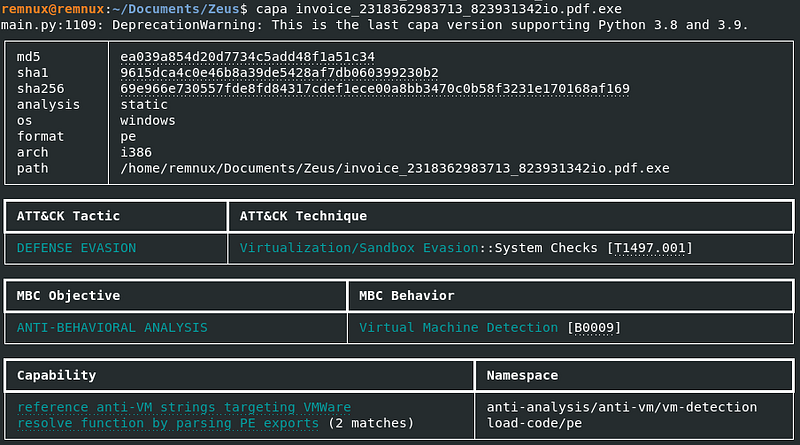
We can see useful information like the Mitre ATT&CK tactic and the technique, as well different hashes that can be ran through VirusTotal.
Right now, based off the information that we have I am trying to determine if this file is packed or not. The high entropy score, suggests that it is packed but I want to be sure. One more static analysis tool that we can use is peframe, by running the following command.
peframe invoice_2318362983713_823931342io.pdf.exe
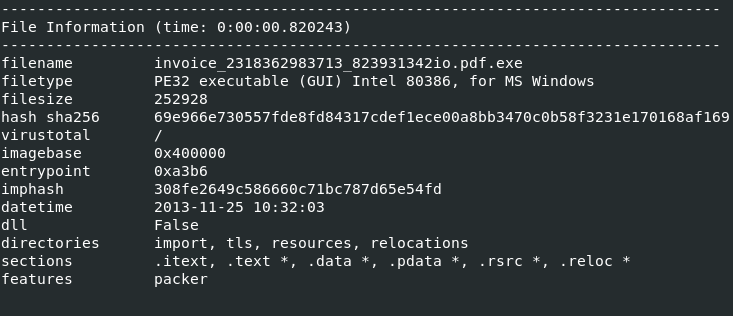



Right here, we can see that it has identified a number of Borland Delpi packer signatures. These could be false positives, but given what we already know about this sample I’d say its a clear indicator. However, it is common for malware to mimic or use multiple toolchains to confuse analysts and evade static detection
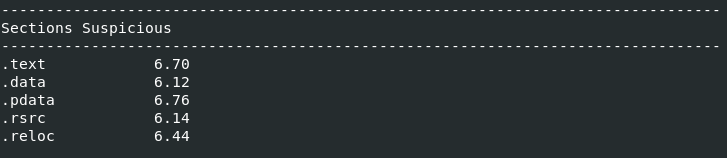
The above is interesting because a "normal" .text section (or what you could consider normal) would usually sit between 5.5 - 6.5, but the .text section we can see above is 6.70. Packed malware would usually sit between 7.50-8.0+.
What does this tell us? Well the values are elevated, but they aren't extremely high, this tells me that it's may not be packed, but possibly lightly obfuscated, Delphi-compiled. If this was aggressively packed, then I would expect the .text section to be around 7.5.

Again, notice how there are no wininet.dll, winhttp.dll, ws2_32.dll, This confirms that it doesn't statically import any networking API's

Let's focus on these breakpoints for a second. A breakpoint is something that you would want to set when conducting dynamic analysis. For instance, if we loaded the executable into x32dbg, we could set a breakpoint on those APIs so the debugger will pause the moment the malware tries to launch another process.
This will allow us to inspect what executable is being launched, what arguments are passed amongst other things.
One thing that is standing out to me is WinExec, which tells me that if we were to set a breakpoint at WinExec, the binary could be about to execute something else. Also WriteFile, which tells me that it could possibly spawn another process, or maybe even execute a dropped payload.
Advanced Static Analysis
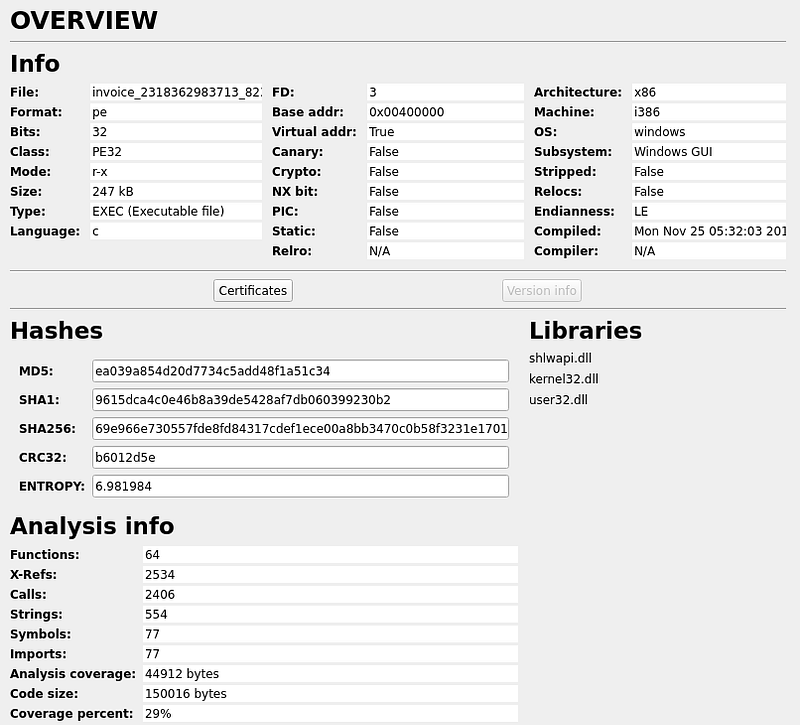
For some advanced static analysis, we will be using a program called Cutter where we can dig further into how this malicious file operates. When we open it up initially you will notice an Overview window, displaying some basic information about the file we are analyzing.
Then if we move across the tabs at the bottom and select Disassembly, you will see the following
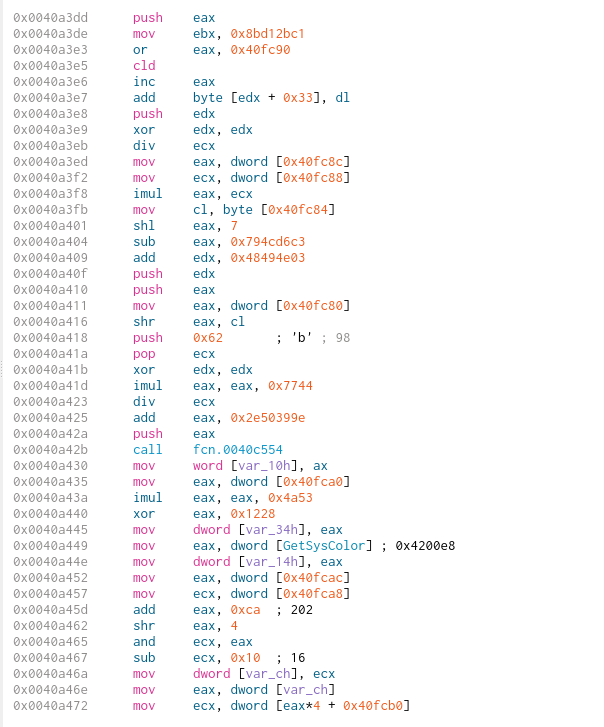
However, after looking through the assembly, I noticed something quite interesting.

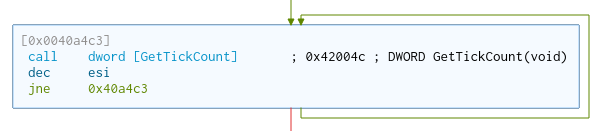
call dword [GetTickCount] ; 0x42004c ; DWORD GetTickCount(void)
The line above is one that sticks out, because GetTickCount is a function that is used to retrieve the number of milliseconds that have elapsed since the system was started. This function could be used to detect if we are running a virtual machine. If you remember back in our basic static analysis when we ran “Capa”, we discovered that this file has “Virtual Machine Detection” capabilities.
Another to note as well, is that if we switch to the Graph view you will notice that there are 2 outcomes depending on which of the parameters are met. So it looks like this loop will jump back to the call if the value of “esi” is not met.
Dynamic Analysis
After my static analysis suggested potential staging behavior but didn't clearly reveal any networking APIs my analysis has now pivoted to dynamic execution within FlareVM in an attempt to capture any potential outbound communication attempts
REMEMBER TO SET YOUR NETWORK ADAPTER TO "HOST ONLY ADAPTER" BEFORE PERFORMING ANY DYNAMIC ANALYSIS
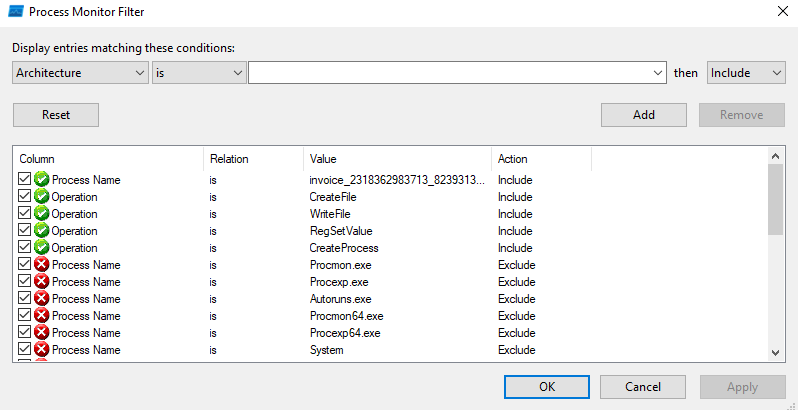
My first port of call is use ProcMon to capture any processes that may be created with executing this piece of malware, with the following filters.
- Process Name is invoice_2318362873713_823931342io.pdf.exe | Include
- Operation is CreateFile | Include
- Operation is WriteFile | Include
- Operation is RegSetValue | Include
- Operation is CreateProcess | Include

This isn't normal behavior for a PDF. These registry keys are related to Internet Explorer/WinINET security zones and the malware could be attempting to bypass proxy (hence the ProxyBypass key).
This is very important because Zeus-style banking malware historically:
- Uses WinINET
- Hooks browsers
- Injects into browser sessions
- Manipulates proxy/zone behavior
These registry changes strongly suggest that the malware is preparing the environment for web-based communication. So, even though we didn't see any WinINET/WinHTTP imports during our static analysis, the registry changes imply that it intends to communicate over HTTP, it may use WinINET APIs, and it may inject into browser processes.
My next approach is to capture any potential C2 channel communication using FakeNet, which simulates internet services. FakeNet will also capture all outbound traffic, log DNS requests, log HTTP requests, respond to connections and prevent real C2 communication.
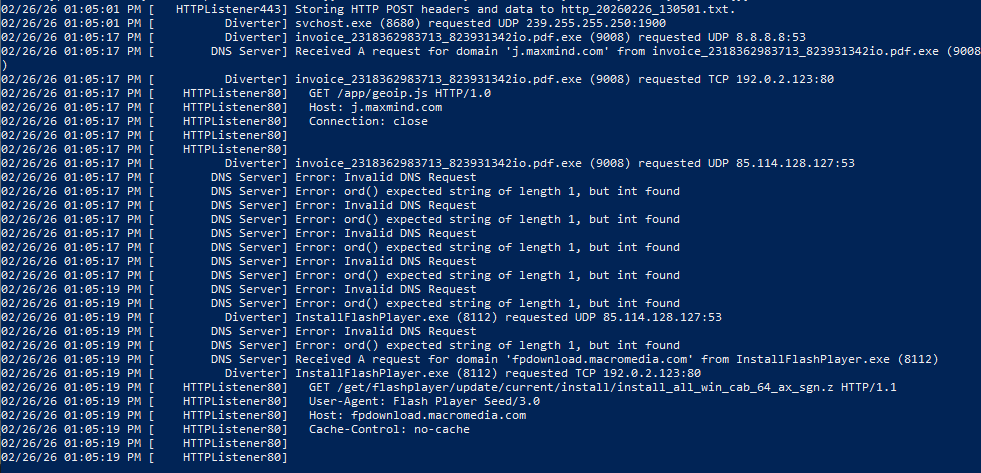
So, from the screenshot above we can see that the executable tried making a DNS request to j.maxmind[.]com with a HTTP request of
GET /app/geoip.js HTTP/1.0 Host: j.maxmind.comNow, maxmind is a GeoIP service and malware will absolutely use this to determine the where victims are in the world, as well as avoiding certain regions. It can also select C2 infrastructure based on location.
It also tried communicating directly with 192.0.2.123 on port 80. This was likely returned by FakeNet as a placeholder response, but it does confirm that the malware was actively attempting to create an outbound TCP connection.
Another IP address observed is 85.114.128[.]127 where the malware tried sending malformed UDP packets on port 53. The malformed DNS packets suggest non-standard or encrypted data transmission over port 53, potentially indicating DNS-based C2 communication or evasion techniques
A secondary process, InstallFlashPlayer.exe, was observed making HTTP requests to fpdownload.macromedia.com, which tells me that the original sample likely dropped or executed a second-stage payload, meaning a multi-stage execution architecture was in use.