Introduction
When getting started in malware analysis, it's easy enough to notice API calls like CreateProcessW in a debugger or disassembler and find out what they do and move on.
But in order to become a better malware analyst, I figured, it's probably a good idea to see a different point of view. From a malware developer's point of view.
So with that being said, I am starting to build small and relatively easy (choosing my words carefully here) programs that can reproduce similar behaviors seen in real life pieces of malware. The goal itself isn't to build a working piece of malware, but to understand the Windows APIs and behaviors enough to be able to spot them when performing analysis.
For the first project, I started with something as simple as possible:
Write a C++ program that launches Notepad.
That sounds trivial—and the final program is. But building it introduced several concepts that appear constantly when analyzing Windows software and malware: processes, threads, handles, structures, Unicode Windows APIs, pointers and CreateProcessW.
What Are We Actually Building?
notepad_spawner.exe
│
│ CreateProcessW()
▼
Windows
│
└──────► notepad.exe
The program isn't injecting anything into Notepad or modifying it. We're simply asking Windows to create a new process. This distinction is important because process creation and process injection are two very different behaviors.
Why CreateProcessW?
Windows exposes many APIs in ANSI(A) and Unicode(W). CreateProcessW is the unicode version, which means that I would be working with wide-character strings. Like so,

wchar_t → wide-character type
w[] → writable character array
L"..." → wide-character string literal
Preparing Windows to Create the Process
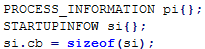
PROCESS_INFORMATION pi{}; - Information Windows gives back to us about the newly created process and its primary thread
STARTUPINFOW si {}; - Information I'm giving to Windows about how the process should start
si.cb = sizeof(si); - This is basically telling STARTUPINFOW that the structure I'm giving you is this many bytes long
STARTUPINFOW
│
│ information IN
▼
CreateProcessW()
│
│ information OUT
▼
PROCESS_INFORMATION
The Intimidating Part: CreateProcessW
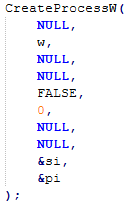
This is the point where things initially started to look a little complicated. In order to launch Notepad, I decided to use the Windows API function CreateProcessW. Upon first glance I'll admit I was a little intimidated but after a while of reading through the documentation, it didn't seem that bad.
It takes 10 parameters, several of which are pointers to structures, and the documentation introduces types and terminology that can be daunting if you're new to all this (like me).
Rather than blindly copying and pasting, I actually worked through each parameter individually and tried to understand what I was passing.
Despite how complicated it first looked, most of the parameters didn't need any special configuration for this to work.
- The first parameter lpApplicationName is set to NULL. This allows Windows to determine the executable to launch from the command line supplied in the second parameter.
- The second parameter is our W variable from before: wchar_t w[] = L"notepad.exe"; This provides CreateProcessW with a writable wide-character buffer containing the command we want to execute.
- The next two parameters lpProcessAttributes and lpThreatAttributes control security attributes associated with the newly created process and its primary threat. Neither required any custom security attributes here so both were set to NULL.
- bInheritsHandles is then set to FALSE. This essentially tells Windows that the new Notepad process shouldn't inherit inheritable handles from my process
- dwCreationFlags is set to 0. Creation flags can be used to alter how a process is created. For this example, I didn't need any special behavior here. I just wanted Notepad to launch normally.
- Both lpEnvironment and lpCurrentDirectory are set to NULL because I don't need to provide a custom environment block or working directory. The new process can just use the defaults inherited from its parent.
- That then leaves the final two parameters, &si and &pi.
- &si - Passes the memory address of my STARTUPINFOW structure to Windows, providing information about how the process should be started.
- &pi - This passes the address of my PROCESS_INFORMATION structure to Windows, which can then populate that structure with information about the process and primary thread it creates.
What initially looked like ten obscure and daunting parameters eventually became much easier to understand when broken down
| Parameter | My Value | Purpose |
|---|---|---|
lpApplicationName |
NULL |
Determine the executable from the command line |
lpCommandLine |
w |
Contains notepad.exe |
lpProcessAttributes |
NULL |
No custom process security attributes |
lpThreadAttributes |
NULL |
No custom thread security attributes |
bInheritHandles |
FALSE |
Don't inherit existing inheritable handles |
dwCreationFlags |
0 |
Use normal/default process creation |
lpEnvironment |
NULL |
Use the parent's environment |
lpCurrentDirectory |
NULL |
Use the parent's current directory |
lpStartupInfo |
&si |
Pointer to my startup information |
lpProcessInformation |
&pi |
Pointer to where Windows returns process information |
One of the biggest lessons for me was learning how to approach unfamiliar Windows APIs like the one above. Instead of looking at a huge function as one big piece of code, breaking it down parameter by parameter and understanding what information is going in and coming out of the API.
The Moment It Worked

And then Notepad actually appeared.
I know it's hardly a sophisticated piece of malware. But seeing another Windows process appear because of a Win32 API call that I had constructed myself gave me a sense of pride. But it also helped me understand the relationship between C++ code and the operating system much more.
Why Does This Matter for Malware Analysis?
CreateProcessW isn't malicious. There are hundreds, if not thousands of legitimate applications that create processes everyday, but what we need to pay attention to is context.
During a malware analysis, seeing process creation APIs can tell us that a sample may be capable of launching another executable. This can allow us to pivot and ask questions like
- What executable could be launched?
- What is the parent process?
- What might happen next?
There's Still a Problem With My Program
Notepad launches, but "it works" doesn't necessarily mean "it's correct."
I'm currently ignoring the return value from CreateProcessW, so my program can't tell whether process creation actually succeeded. I'm also receiving handles to the new process and its primary thread without closing them.
That's what I'll fix next.
After that, I want to start observing these programs from the other side—using tools such as Sysmon, Process Monitor and eventually a debugger—to see exactly what the behaviour I've written looks like to a defender.